Desk Setup to Stop Pain Between the Shoulder Blades

If your upper back aches by mid-afternoon, your desk is often the real culprit. A low screen, a far keyboard, and an unsupportive chair quietly force your shoulders forward all day. The fix is simple ergonomics, not endless stretching. 🪑
The best desk setup for pain between the shoulder blades keeps your monitor at eye level, your elbows supported near 90 degrees, and your screen close enough that you never lean forward, so the muscles between your shoulder blades stop holding you up all day.
TL;DR
- A poor desk setup is a leading cause of pain between the shoulder blades. ✅
- Raise your monitor so the top sits at eye level. 👀
- Pull your chair in and support your elbows near 90 degrees.
- Bring the screen close so you never crane or lean forward.
- Take a posture reset every 30 minutes. ⏱️
- Ergonomics reduces the strain, but strengthening stops it returning. 💪
If you have not yet checked the underlying causes of pain between the shoulder blades, that gives the full picture before you adjust your workstation.
Why Does Your Desk Cause Pain Between the Shoulder Blades?
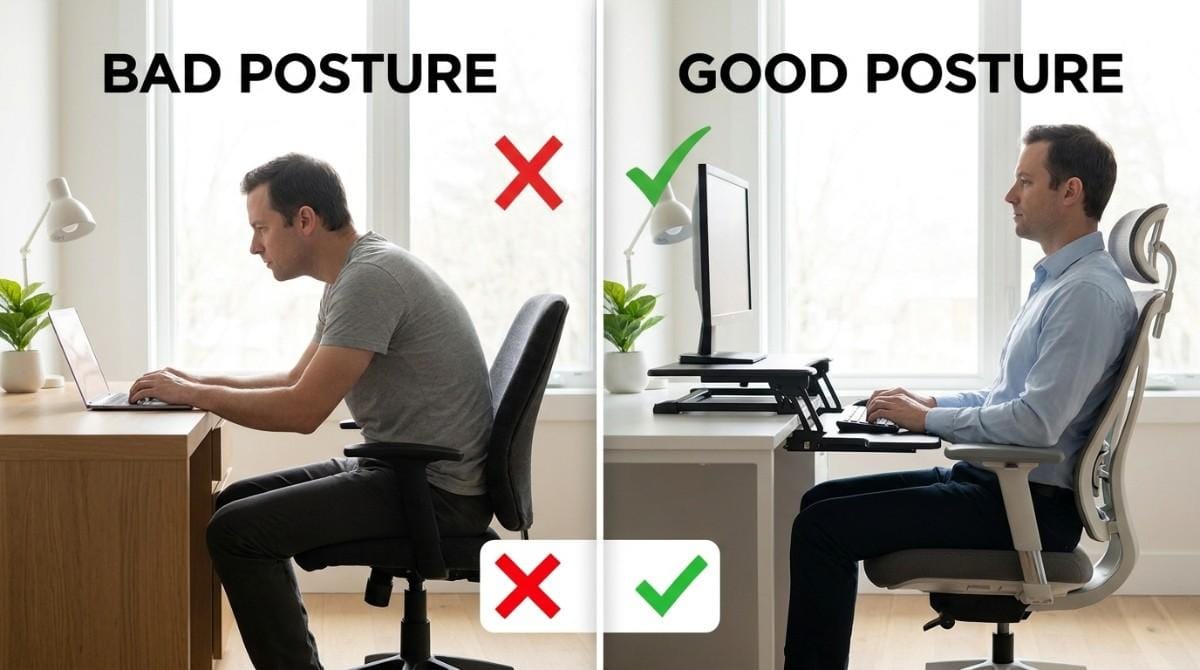
When your screen is too low or too far, your head drifts forward and your upper back rounds. The muscles between your shoulder blades, the rhomboids and middle trapezius, then spend hours holding your collapsing posture in place.
That constant low-level effort is what creates the dull ache and burning between the shoulder blades. Fix the setup and you remove the cause, not just the symptom. This is the same forward-rounding pattern behind rounded shoulders and forward head posture.
How Should You Set Up Your Desk?
Use this checklist. Each item reduces the forward pull on your upper back.
| Setup item | Ideal position | Why it helps the upper back |
|---|---|---|
| Monitor height | Top of screen at eye level | Stops the head dropping forward |
| Monitor distance | About an arm's length | Removes the urge to lean in |
| Chair height | Feet flat, knees near 90 degrees | Stabilizes your base |
| Armrests | Elbows supported near 90 degrees | Unloads the shoulders and traps |
| Keyboard and mouse | Close, elbows at your sides | Stops reaching that rounds the shoulders |
| Laptop | On a riser with external keyboard | Ends the permanent hunch |
A laptop on a desk is the single worst offender, because the screen and keyboard cannot both be in the right place at once. A riser plus an external keyboard solves it instantly. 💡
💡 Want to know if your setup is actually fixing your posture or just hiding it? Backed AI scans your alignment and tells you exactly what still needs work.
Best Desk Fixes for Pain Between the Shoulder Blades (Quick List)
If you only do a few things, do these.
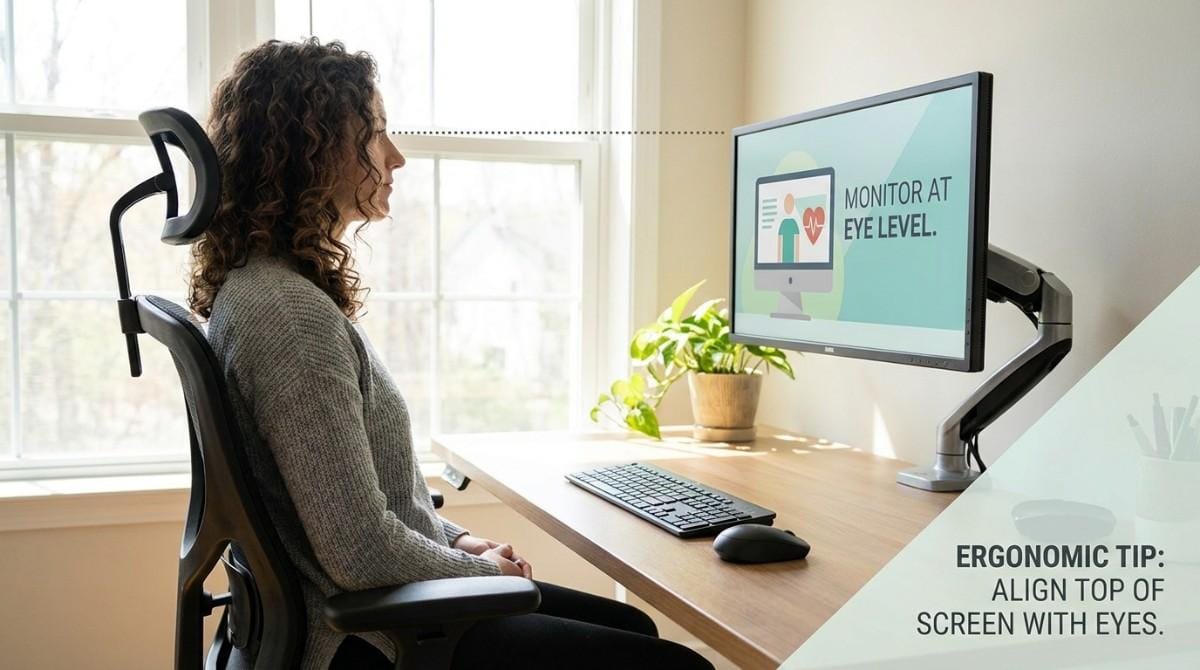
- Raise the monitor. Use a stand or books so the top of the screen meets eye level.
- Pull the chair in. Sit close so your back stays supported and you stop reaching.
- Support your elbows. Adjust armrests so the shoulders relax down, not up.
- Move the screen closer. Roughly an arm's length away to kill forward lean.
- Add a footrest if needed. Flat feet stabilize the whole chain above.
- Set a 30-minute reminder. Stand, roll the shoulders back, and reset. 🔄
A standing desk helps only if the monitor height is right. Standing while looking down at a low laptop creates the same upper-back strain as sitting.
Step-by-Step Desk Reset Framework
Set it up once, then protect it with movement.
- Measure your eyeline. Sit tall and mark where your gaze lands. The top of the screen should meet it.
- Raise and pull in. Lift the monitor and bring the chair close.
- Support the arms. Set armrests so the shoulders drop and relax.
- Add movement. Schedule a posture break every 30 minutes.
- Reinforce with training. Strengthen the upper back so good posture feels effortless.
A quick desk-friendly reset like a 5-minute wall angel break for desk workers pairs perfectly with the setup above.
A perfect desk reduces the strain, but if the muscles between your shoulder blades are already weak, only strengthening stops the ache from creeping back each afternoon.
What Happens If You Don't Fix Your Setup?
Left alone, a bad setup turns occasional soreness into a daily pattern. The chest tightens, the upper back weakens, and forward posture becomes your default even away from the desk. 😬
Over months this feeds neck tension and tension headaches too. The good news: a few setup changes interrupt the cycle immediately.
Research & Expert Insight
Physiotherapists often recommend correcting monitor height and seating before prescribing exercises, because the workstation is usually where the strain begins. Posture specialists suggest that frequent movement breaks matter as much as the static setup itself. Research in occupational health shows that desk workers who improve ergonomics and add regular postural movement report measurable reductions in upper-back and neck discomfort over a few weeks. 📚
When This Approach Doesn't Work
Ergonomics fixes the cause for most people, but not every case.
Setup changes alone are not enough if:
- The muscles between your shoulder blades are already weak and need strengthening.
- Your posture pattern is long-standing and needs active retraining.
Seek medical care if you have:
- Chest tightness, breathlessness, or pain spreading to the jaw or arm. 🚨
- Numbness, tingling, or weakness in the arms or hands.
- Pain after a fall, or pain that keeps worsening over two weeks.
Why Most Exercise Plans Fail
A great desk helps, but people still stall when they try to fix the rest on their own. The reasons are predictable:
- Inconsistency. Posture breaks get skipped on busy days.
- Wrong form. You cannot see your own rounding from the inside.
- No progression. The same beginner moves repeat for months.
- No personalization. Generic plans ignore your specific pattern.
That is why two people with the same desk and the same pain between the shoulder blades often need different routines.
Pair the Setup With a Smarter Plan
Backed AI is an AI posture correction app that completes the picture. It uses your phone camera to analyze your posture, then builds a corrective routine around your exact pattern.
- Personalized: targets your forward-rounding pattern, not a generic list. 🎯
- Guided: clear video form so you train the right muscles.
- Consistent: reminders and progress tracking that fit a workday. 📈
Fix the desk, then follow the full exercise routine for pain between the shoulder blades or a quick desk-worker posture routine to make upright posture effortless.
Download Backed AI and start correcting your posture today.
Final Takeaway
Pain between the shoulder blades is often built at your desk. Raise the monitor, support your arms, pull everything close, and move every half hour. Combine that setup with targeted strengthening, and the daily ache finally stops.
FAQ
Can my desk setup cause pain between the shoulder blades?
Yes. A low or far monitor and an unsupportive chair force your shoulders forward, overloading the muscles between the shoulder blades.
How high should my monitor be to prevent upper-back pain?
The top of the screen should sit at eye level, about an arm's length away, so your head stays stacked over your shoulders.
Does a standing desk help pain between the shoulder blades?
Only if the monitor height is correct. Standing while looking down at a low laptop strains the upper back the same way sitting does.
How often should I take posture breaks at my desk?
Aim for a short reset every 30 minutes: stand, roll your shoulders back, and open your chest.
Will fixing my desk alone stop the pain?
It removes a major cause, but if the upper-back muscles are weak, you also need strengthening to keep the pain from returning.