Best Sitting Position for Lower Back Pain (With Setup Diagrams)
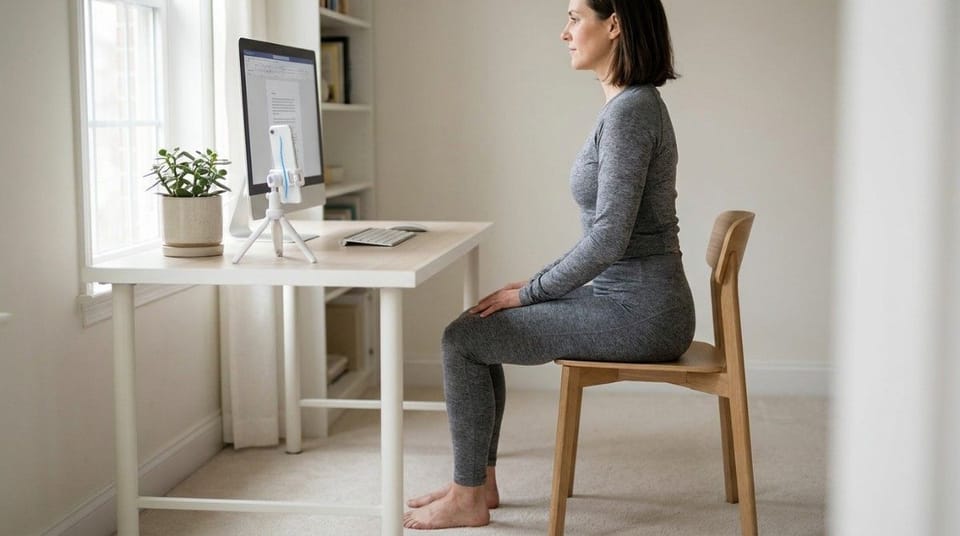
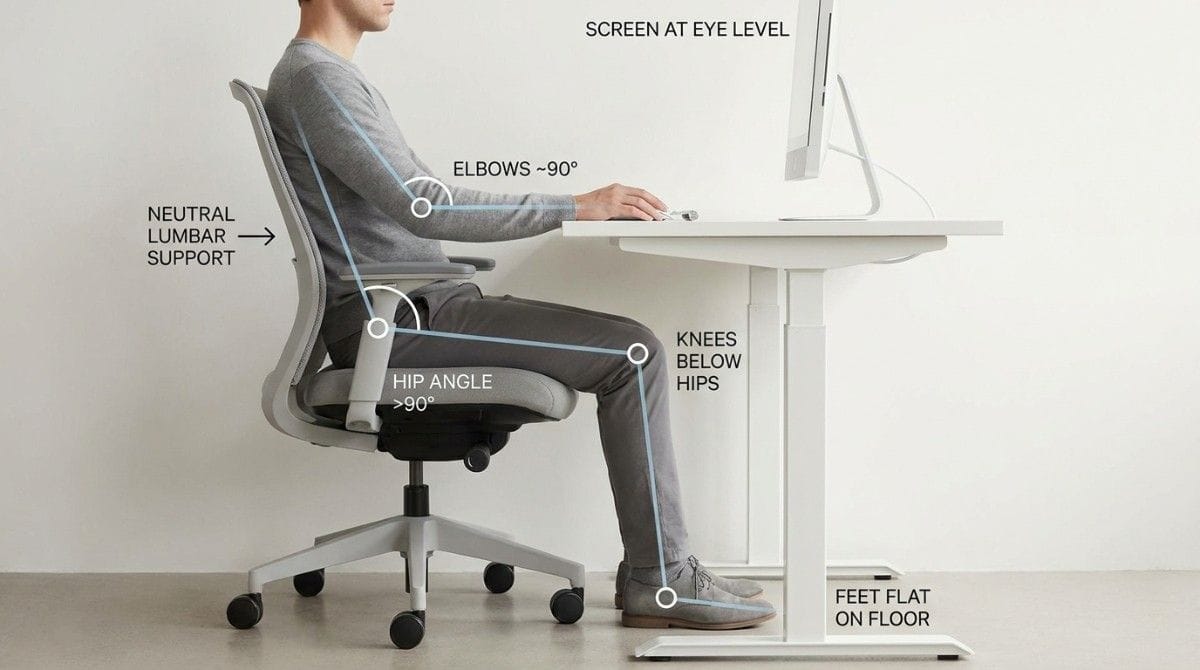
The best sitting position for lower back pain keeps your spine neutral: hips slightly higher than your knees, feet flat on the floor, lower back supported, and your screen at eye level. This position preserves the natural curve of your lumbar spine and spreads load evenly instead of concentrating it. The exact angles matter, and small adjustments make a surprising difference.
Neutral sitting posture is a seated position where the spine keeps its natural curves, the pelvis stays balanced, and load spreads evenly across the lower back rather than concentrating in one area.
TL;DR
- Keep hips slightly higher than knees (roughly a 100 to 110 degree hip angle).
- Feet flat and fully supported on the floor or a footrest.
- Lumbar support to maintain the natural lower-back curve.
- Screen at eye level, elbows near 90 degrees.
- Shoulders relaxed, ears stacked over shoulders.
- No position is good forever, so movement still matters.
What Is the Best Sitting Position for Lower Back Pain?
The ideal position is "neutral spine." That means your lower back keeps its gentle inward curve, your pelvis sits balanced, and your head stacks over your shoulders.
Most back pain from sitting comes from drifting out of neutral. People slouch, perch forward, or collapse to one side. Each of these loads the lumbar spine unevenly.
Understanding why this matters starts with the seated mechanism, explained in our guide on lower back pain from sitting.
How Should You Set Up Your Chair and Desk?
Good posture is easier when your setup supports it. Here are the target measurements.
| Element | Target Setting |
|---|---|
| Seat height | Hips level with or slightly above knees |
| Hip angle | 100 to 110 degrees (slightly open) |
| Feet | Flat on floor or footrest |
| Lumbar support | Fills the curve of your lower back |
| Elbows | Near 90 degrees, relaxed shoulders |
| Screen top | At or just below eye level |
| Screen distance | About an arm's length away |
If your chair lacks proper support, the furniture choices in our office chair vs standing desk comparison can help you upgrade the right way.
💡 Key Insight: The "perfect" position is not about sitting rigidly upright like a soldier. It is about staying near neutral, with support, while keeping the freedom to shift. Stiffness is as harmful as slouching.
Why Does Your Sitting Position Matter So Much?
Position decides where the load goes.
In neutral posture, your spine's natural curves act like a spring, absorbing and distributing force. The discs stay evenly loaded. The supporting muscles work at a comfortable level.
When you slouch, the pelvis rolls back, the lumbar curve flattens, and disc pressure spikes. When you over-arch, the facet joints at the back compress. Either extreme, held for hours, creates pain.
This is also how tight hip flexors quietly pull you out of neutral, the pattern covered in our breakdown of hip flexor pain when sitting.
Best Sitting Position Checklist (Quick List)
- Sit back fully. Let the chair support you. Do not perch on the edge.
- Set hips above knees. Raise your seat or add a wedge cushion.
- Plant your feet. Flat on the floor, or use a footrest if they dangle.
- Support your lumbar. A small cushion or built-in support fills the lower-back curve.
- Relax your shoulders. Drop them down and back, away from your ears.
- Stack your head. Ears over shoulders, not jutting toward the screen.
- Shift often. Change position slightly every few minutes, and stand every 30 to 45 minutes.

Common Sitting Mistakes That Hurt Your Back
Avoid these frequent errors:
- Slouching back. Flattens the lumbar curve and spikes disc pressure.
- Perching forward. Removes back support and overworks the lower back.
- Crossing legs. Tilts the pelvis and twists the spine over time.
- Screen too low. Pulls the head forward and cascades strain down the spine.
- Sitting too long. Even perfect posture becomes harmful when held for hours, as explained in our guide on how long you can sit before back damage.
If you fix your sitting position but still feel pain, an existing imbalance is usually the reason, like a tilted pelvis or weak core. An AI posture scan can spot what you cannot see in a mirror. That is what Backed AI was built for.
How To Adjust Your Position for Your Body Type
One setup does not fit everyone. Adjust for your proportions.
- Tall? Raise the desk and screen so you are not hunching down. Watch knee clearance.
- Shorter? Use a footrest so your feet are supported and hips stay above knees.
- Long torso? Pay extra attention to lumbar support placement.
- Wider hips? Ensure the seat is wide enough to avoid forcing a tilt.
The principle stays the same: neutral spine, supported lumbar, balanced pelvis. The measurements flex to fit you.
The 3-Step Sitting Reset (Step-by-Step)
| Step | Action | When |
|---|---|---|
| Step 1 | Reset to neutral: sit back, feet flat, lumbar supported | Every time you notice drift |
| Step 2 | Micro-shift: small position changes to avoid static load | Every few minutes |
| Step 3 | Stand and move: break disc pressure, restore circulation | Every 30 to 45 minutes |
This rhythm keeps you near neutral without forcing rigid stillness. For desk workers wanting a fuller daily plan, our guide to lower back pain for desk workers layers movement and exercise on top.
Research & Expert Insight
Research in ergonomics and musculoskeletal health is consistent on a few points.
Hip angle: A slightly open hip angle (over 90 degrees) reduces lumbar disc pressure compared to a tight 90-degree or closed angle.
Lumbar support: Studies show lumbar support that maintains the natural curve reduces reported back discomfort during seated work.
Movement still wins: Even the best posture, held statically, increases discomfort over time. Position plus movement consistently outperforms position alone.
The takeaway: a good sitting position lowers your baseline load. It buys you time. Movement and strength do the rest.
When This Approach Doesn't Work
Optimizing your sitting position helps most people. But seek medical evaluation if you experience:
- Pain radiating below the knee (possible sciatica or disc involvement)
- Numbness, tingling, or weakness in the legs
- Loss of bladder or bowel control (emergency)
- Pain unaffected by any change in position
- Persistent night pain that disturbs sleep
- Pain following a fall, accident, or trauma
These signs may point to a structural cause that needs imaging and specialist care.
Final Takeaway
The best sitting position for lower back pain is neutral spine: hips above knees, feet supported, lumbar curve maintained, head stacked over shoulders. Set up your chair and desk to make that position easy to hold.
But remember the honest truth. No position is good forever. The best posture in the world still needs movement breaks and the underlying strength to support it.
Get the position right, move often, and address the imbalance underneath. That combination is what actually ends sitting-related back pain.
Why Perfect Posture Advice Often Fails
You can read every sitting guide and still hurt. Here is why:
- You cannot see yourself. Posture drifts the moment you stop thinking about it.
- No feedback loop. Without correction, bad habits return within minutes.
- An existing imbalance. A tilted pelvis or weak core pulls you out of neutral no matter how you sit.
- No follow-through. Knowing the position is not the same as building the habit.
This is why two people with the same advice get different results. The instructions are identical. The bodies, and the consistency, are not.
Backed AI: See What Your Mirror Can't
Backed AI is an AI posture correction app built for exactly this gap. It scans your posture from your phone camera, identifies the imbalance pulling you out of neutral, and builds a daily routine that adapts as you improve.
What you get:
- 🎯 AI posture analysis that reveals your exact pelvic tilt, lumbar position, and postural drift, no guesswork.
- 📱 Personalized daily routines that strengthen and mobilize the muscles keeping you out of neutral.
- 🔔 Smart posture reminders that catch the slouch before it becomes a habit during your workday.
A good sitting position lowers your load. Backed AI fixes the imbalance that makes neutral feel like work.
Download Backed AI and start correcting your posture today.
FAQ
Q1: What is the best sitting position for lower back pain?
Neutral spine: hips slightly higher than knees, feet flat on the floor, lower back supported, shoulders relaxed, and head stacked over your shoulders. This spreads load evenly instead of concentrating it on the lumbar spine.
Q2: Should I sit up perfectly straight to protect my back?
No. Rigid, military-straight sitting is as harmful as slouching. Aim for a relaxed neutral spine with lumbar support, and allow small position shifts. Stillness in any position causes problems over time.
Q3: How high should my chair be for lower back pain?
Set your seat so your hips are level with or slightly above your knees, giving a hip angle of about 100 to 110 degrees. Your feet should rest flat on the floor or a footrest.
Q4: Does lumbar support actually help lower back pain?
Yes. Lumbar support that fills the natural curve of your lower back helps maintain neutral posture and reduces reported discomfort during long seated work.
Q5: Can the right sitting position cure my back pain?
A good position lowers your baseline load and helps a lot, but it rarely cures pain alone. Most sitting-related pain also needs movement breaks and corrective exercise for the muscles weakened by sitting.